A private diary that never nags
By Bishop Technology Solutions, LLC, the maker of Bishop Vault. Facts checked October 25, 2026.
What makes a diary app private, what to look for before you trust one with your words, and what iCloud and Apple can see.
The short answer
A private diary needs three things: its own lock, so that opening your phone doesn’t open your diary; real encryption that covers your entries and their dates; and silence. A diary that sends reminders, shows badges, or puts a widget on your Home Screen tells everyone near your phone that you keep one. Past those three, check what leaves the device: exports, backups, and iCloud.
What makes a diary private
- Its own passcode. If the diary opens with the same passcode as your phone, anyone who knows that passcode reads it. A separate passcode keeps your diary closed even when someone else is using your unlocked phone.
- Encryption you can read about. The words should be encrypted on your device before they are stored, and so should the dates and titles, since those say a lot. Look for the name of the encryption and a page that explains it, not just the word “secure.”
- No nagging. Reminders, notifications, badges, widgets, and streak counters all show up outside the app, where other people can see them. They are also pressure: a streak turns writing into a chore you can fail.
- No surprises from the past. Some apps pull up an old entry to show you. That is fine until the wrong person is looking at your screen. A private diary shows only what you ask for.
- An honest account of where the words go. Exports, backups, and cloud copies are where privacy usually leaks. The app should tell you plainly what each one does.
What iCloud and Apple can see
By default, Apple says it keeps the encryption keys for iCloud data that isn’t end-to-end encrypted in its data centers, which lets it decrypt your data for you when you sign in on a new device or recover a password. Apple’s optional Advanced Data Protection changes that for most iCloud data, including iCloud Backup, Photos, Notes, and iCloud Drive, so that only your trusted devices hold the keys. It has to be turned on, and it requires a recovery contact or a recovery key. Apple also says some metadata stays under standard protection even then, such as backup dates, file types, and modification dates.
What this means for a diary: Bishop Vault encrypts your entries on your device first, so if its files reach iCloud, for example in your device’s iCloud Backup, Apple sees only scrambled files. The timing is a different matter.
The limit, said plainly: Apple can see when the files change, not what changed. Writing every night shows as a change every night, and a long writing session shows as several changes.
This is true of any diary whose data lands in iCloud, not only this one. If the habit of writing nightly is itself private, remember that a nightly change is visible to Apple, even though the words aren’t. With your device’s own iCloud Backup turned on, the encrypted Bishop Vault files are part of that backup, and the long key that opens them is protected so that it works only on the device it was made on, so they can’t be opened from the backup on another device without your recovery kit. You can turn iCloud Backup off in your device’s Settings if you don’t want a copy there.
How Bishop Vault’s diary works
The diary is part of Bishop Vault Plus (see pricing). Everything else in this section is how it behaves.
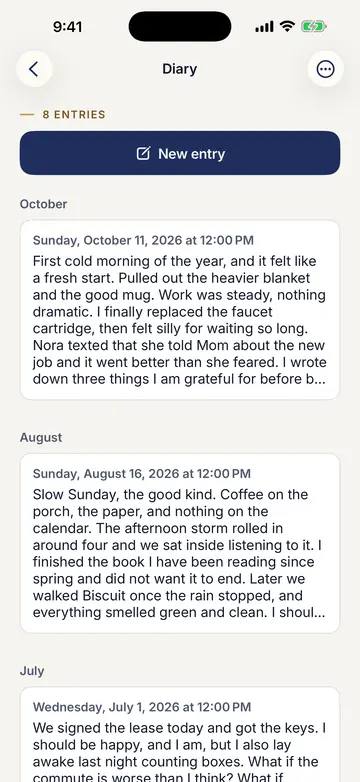
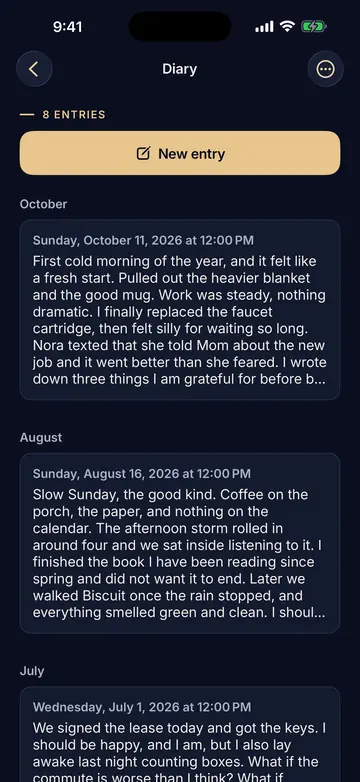
- Dated entries. Each entry gets the date and time you start it. You can change its “Written for” date, for example to write yesterday’s entry today. Entries show newest first, and you can flip to oldest first.
- Behind the vault passcode. The entries, their dates, and everything else in the vault are encrypted on your device. See how the encryption works.
- Never nags. The diary has no reminders, notifications, badges, widgets, or streaks, and it never shows you an old entry you didn’t ask for.
- Private typing. The editor turns off autocorrect, spell check, text suggestions, and Writing Tools. On iPhone and iPad, other companies’ keyboards never work in Bishop Vault. Copied text stays on the device and is cleared after 1 minute, or when the vault locks.
- Search. Search finds words in your entries, and it forgets everything when the vault locks.
- Saved as you go. Entries save when you tap Back, when the vault locks, and every few minutes while you write.
- Yours to keep. Export diary makes one text file with the date over each entry. That copy is no longer encrypted, so keep it somewhere safe. If Plus ends, you keep your diary: you can still read, edit, export, and delete every entry, but you can’t add new ones.
- Deleting. A deleted entry is gone from the vault, but older backup files still hold it.
Like the rest of Bishop Vault, it protects against everyday snooping. It can’t stop spyware already on your device, or someone watching you type your passcode. No outside security review yet.
A checklist for any diary app
- Does it have a passcode of its own, apart from your phone’s?
- Does it name its encryption and explain it?
- Does it encrypt dates and titles, or only the text?
- Can you turn off every notification, badge, and widget, or do none exist?
- Does it ever show you an old entry unprompted?
- What does an export contain, and is it encrypted?
- What happens if you forget the passcode? If the answer is “we reset it,” then someone else can open your diary.
When you don’t need Bishop Vault
A paper notebook in a drawer needs no app and no passcode, and nothing about it reaches iCloud. Apple’s own Journal app is end-to-end encrypted in iCloud by default, Apple says, so it is a fair choice if you don’t need photos and scans in the same place. If you only want a diary other people won’t stumble on, any app that has its own lock and stays quiet may be enough. A vault diary helps when you also want your photos, scans, and notes in the same locked place, and a diary with no pressure to write. Bishop Vault is coming soon.
Facts checked on October 25, 2026
- Standard iCloud data protection, Advanced Data Protection, recovery contact or key, the metadata that stays under standard protection, and Journal data being end-to-end encrypted by default: Apple Support, https://support.apple.com/en-us/102651 (read October 25, 2026).
Facts about Bishop Vault come from its own help and source.
Keep reading
See how Bishop Vault encrypts your things, then see how Bishop Vault compares with other photo vaults, or read about storing ID documents on iPhone or keeping private photos on a Mac.
Coming soon to iPhone, iPad, and Mac.