How Bishop Vault keeps your things private
The plain version first, then the details for people who like to check.
In plain words
Everything in the vault is encrypted on your device before it is stored. That means it is scrambled with a key, and without the key it is noise.
Here is what happens to a photo:
- You add it. Location data is removed from every photo and video as it comes in. A video is refused if any is left.
- Bishop Vault encrypts it on your device with a key made for that one photo. Videos, notes, scans, and files work the same way, each on its own.
- Only the scrambled version is stored. The name and the date are kept inside the encryption, and the size is padded so it does not show exactly. The vault’s copy never appears in Photos, in Files, or in the app switcher. The original stays in Photos until you delete it, and Bishop Vault can offer to delete it for you.
- To open it, you type your passcode. Your passcode, plus a secret key that lives on your device and in your printed recovery kit, unlocks the vault. On iPhone and iPad, the vault locks again when you leave the app. On a Mac, it locks when the Mac sleeps or its screen locks, and after a set time in the background.
The secret key is Bishop Vault’s own name for a long random key, made once on your device when you set up. It is the reason that a copy of the vault files alone is not enough to start guessing passcodes.
Why a lost passcode and kit can’t be undone
There is no account and no server, and Bishop Vault never holds a copy of your key. So there is no one who can reset it.
If you forget your passcode, your recovery kit gets you back in: you type the recovery code and choose a new passcode. If you lose the kit and forget your passcode, no one can open the vault, not even Bishop Vault.
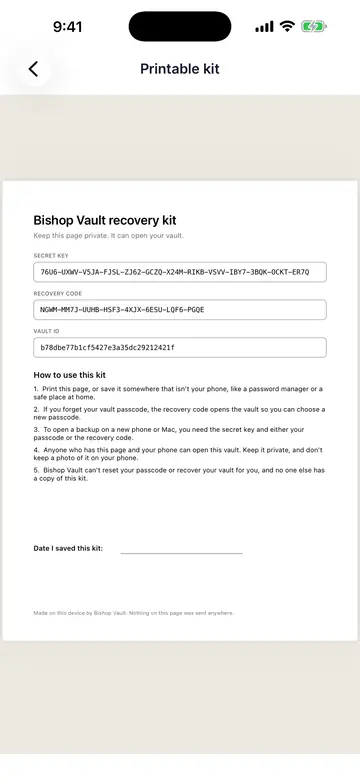
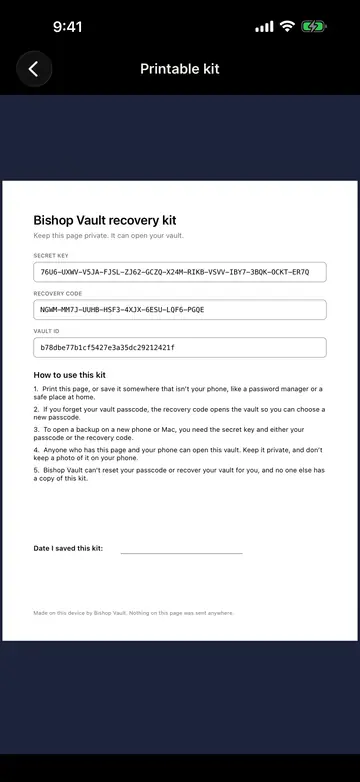
The kit is a one-page PDF with the vault ID, the secret key, and the recovery code. Print it or save it somewhere other than your phone, and keep it somewhere safe. Anyone who has the kit can open the vault. The kit also matters for backups: opening a backup on a new device takes the secret key from the kit.
If you get a new phone. If you restore a new phone from a device backup (iCloud Backup, a computer, or a Mac’s Migration Assistant), your vault files come along, but the secret key doesn’t, because it is protected so that it works only on the device it was made on. The app then shows a page called Open your vault on this device: you type the secret key from your kit, the app checks it against your vault and saves it on the new device, and then you type your passcode as usual. That is why the kit matters.
If someone may have seen your kit. A kit that someone has seen opens the vault until you replace it, and changing your passcode doesn’t stop it. Make a new recovery kit, in Settings, then Recovery, gives the vault a new recovery code, and the old kit stops opening the vault. It asks for your passcode first. The secret key can’t be changed, so the new kit has the same secret key, but on its own the secret key opens nothing without your passcode. Old backup files and old device backups still open with the old kit, so after you make a new kit, delete your old backups and make a new one.
The details, for people who check
Everything below comes from the app’s own source and its written format. If you find a mistake, tell us.
Building blocks
Every primitive comes from libsodium 1.0.22, built from the signed release (its SHA-256 and minisign signature are checked against libsodium’s published key). Nothing is home-made.
| Use | Primitive |
|---|---|
| Passcode stretching | Argon2id v1.3, 32-byte output |
| Key derivation | HKDF-SHA256 (RFC 5869) |
| Encryption | XChaCha20-Poly1305 (IETF), 24-byte random nonce, 16-byte tag |
| Hash for the change log chain | BLAKE2b-256 |
| Randomness | libsodium’s randombytes_buf |
Passcode stretching
Your passcode is normalized (Unicode NFC) and stretched with Argon2id, with a random salt per keyslot. The default cost is 3 passes over 128 MiB of memory, and the cost is stored in each keyslot. A reader refuses a keyslot that asks for an absurd cost. A new passcode needs at least 8 characters. Wrong tries bring longer waits: none for the first 5, then 30 seconds, then 1, 5, 15, and 60 minutes. The count is stored on your device.
Layered keys
Each vault has its own random 256-bit master key. The master key is sealed in small keyslot files, and each way in has its own:
- Passcode. The stretched passcode is combined with the 256-bit secret key through HKDF-SHA256, and the result is the key that seals the master key.
- Recovery code. A random 160-bit code, shown in groups of four letters and digits, is run through HKDF-SHA256 to make the key that seals the master key. It does not need the passcode.
- Face ID or Touch ID, if you turn it on. It uses a Secure Enclave key, biometrics only, and it never falls back to your device’s passcode. This keyslot stays on that device. It never goes into a backup.
Changing your passcode rewrites one 176-byte keyslot and re-encrypts nothing else.
Your files
Each item gets its own key, derived with HKDF from the vault’s master key and the item’s random ID. It is encrypted with XChaCha20-Poly1305 in 64 KiB chunks, and each chunk is bound to its position, so chunks can’t be reordered, dropped, or moved to another file without detection. The file is padded up to a size step, so its exact size doesn’t show; the padding adds at most about 12 percent for anything over 4 KB, and smaller items are padded to 4 KB. Thumbnails and the words read from scans are separate encrypted files.
Names and dates
Names, dates, types, and sizes live only in an encrypted, append-only change log. Each device writes its own log, and each entry carries the hash of the one before it. One honest limit: someone who can change the stored files could remove the newest entries of a log without it being noticed. There is no signed head yet.
What is stored where
- In the vault files: encrypted item files, encrypted thumbnails, the encrypted change log, and the keyslots for the passcode and the recovery code. Anyone who can see these files can see how many there are, their padded sizes, what kind each one is (an item, a thumbnail, or the words from a scan), and when they change.
- In this device’s Keychain: the secret key. It is never in the vault files.
- Also on this device: the wrong-passcode count and, if you turn it on, the Face ID or Touch ID keyslot. Neither is in the vault files.
- In your printed kit: the vault ID, the secret key, and the recovery code.
- In memory: keys are held in libsodium’s protected memory and zeroed when released. Nothing is logged.
Backups
A backup is one file that copies the encrypted vault files as they are, with nothing decrypted. The secret key and the Face ID or Touch ID keyslots are never in it. Opening it takes the secret key and your passcode or recovery code. Bishop Vault checks the whole file before it replaces anything, and a damaged file, a wrong key, or a wrong passcode changes nothing.
Test vectors
The on-disk format is versioned, and a reader refuses a version newer than it knows. The test vectors are the checkable part: fixed test-only inputs and the exact outputs they must produce, such as the Argon2id result, the derived keys, a keyslot file, a file header, a change log entry, and the vault’s metadata file. The app’s tests check them, and a second implementation written in plain JavaScript, using @noble/hashes 1.8.0 and @noble/ciphers 1.3.0 and no libsodium, re-derives them: 14 of 14 match for format version 1, and 9 of 9 for version 2.
Download them as plain text: format-v1.txt and format-v2.txt. The full written description of the format is not published yet.
What it protects against
- Someone looking through your phone. A partner, family member, roommate, or friend with it unlocked. The vault has its own passcode.
- A thief with your unlocked phone. Face ID or Touch ID works only for faces and fingers set up on this phone, never falls back to its passcode, and asks for the vault passcode after a restart. Wrong tries bring longer waits.
- A quick look in Photos or Files. Vault items don’t appear there or in the app switcher. Everything is encrypted on this device.
- Someone who copies the files off your phone. Everything inside is encrypted. A copy of the files alone can’t be read. A lab that pulls everything off an unlocked phone, including its Keychain, would still have to guess your passcode, and a long passcode is what stops that.
What it can’t stop
- Spyware already on your device.
- Someone watching you type your passcode.
- Forensic tools, police, or border searches. Bishop Vault makes no promise against them. Here is what is true. Without your passcode or your recovery kit, the vault is encrypted data: it can be copied, but not read. Even with a full copy of an unlocked phone, someone still has to guess your passcode, and every guess is made slow on purpose. So your passcode decides how far they get. With a short one, like a word and a year, the slow guessing only slows them down. With a long one, guessing can take longer than anyone has, so at best they never get in. Nothing helps if someone makes you unlock the vault, or sees your screen while it is open. We have not tested Bishop Vault against any lab’s or agency’s tools.
No outside security review yet.